
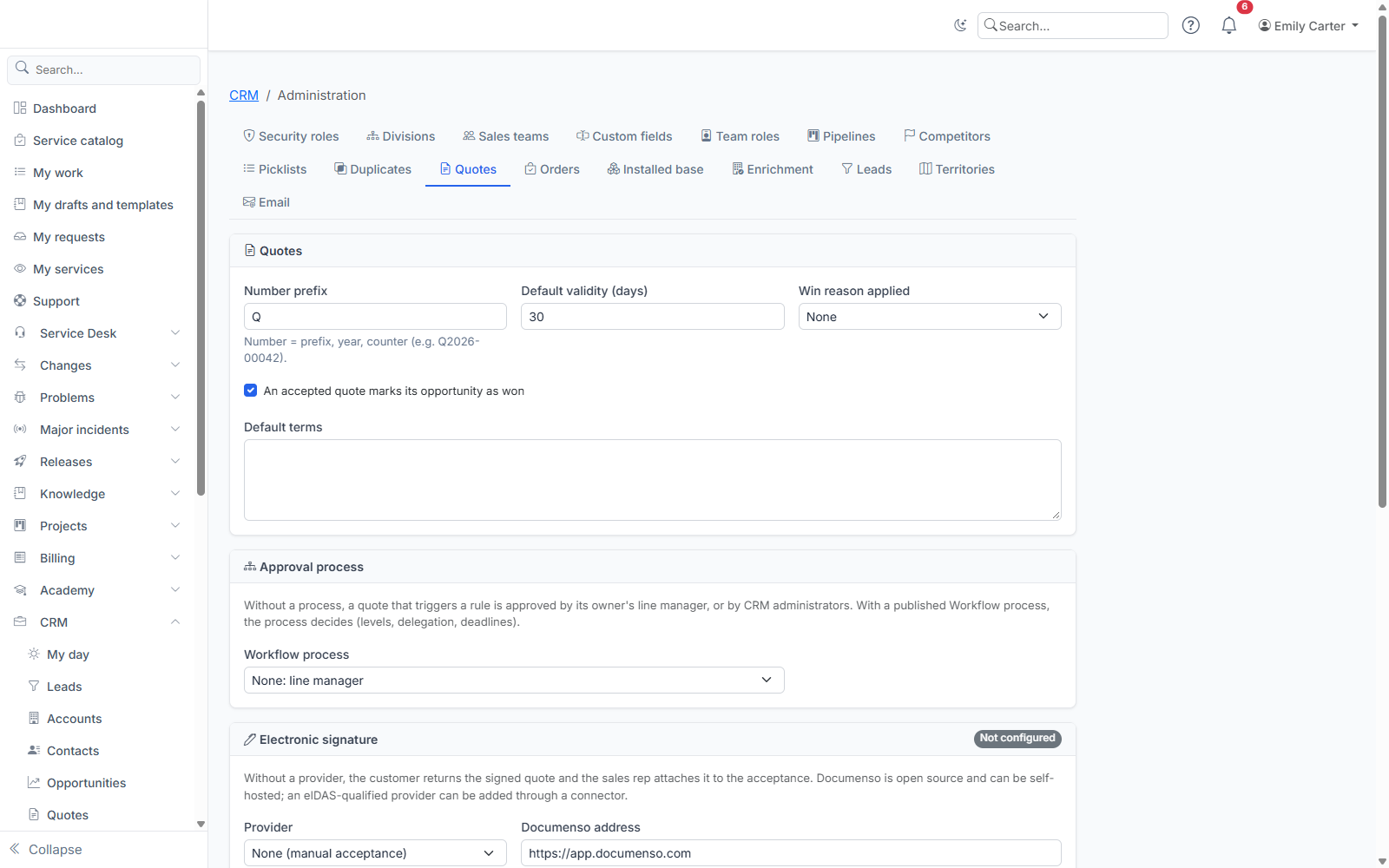
Quote settings are in CRM › CRM administration › Quotes (address: /crm/admin/quotes), reserved for Administrators and CRM administrators.
General settings
- Number prefix: a quote number is this prefix, the year and a counter (
Q2026-00042). The counter restarts at 1 every year. - Default validity: number of validity days suggested at creation (30 by default).
- An accepted quote marks its opportunity as won: ticked by default. The win reason applied comes from the win reasons list; leave it empty if your pipeline does not require one.
- Default terms: the terms text (payment, delivery…) copied onto each new quote; the sales rep can edit it.
Approval rules
A rule triggers an approval before sending. Five types:
| Rule | Threshold |
|---|---|
| Line discount above | in % |
| Overall discount above | in % |
| Margin below | in %; if the margin is unknown (a revenue line has no cost), approval is requested to be safe |
| Quote contains the product | a catalog product |
| Total excl. tax above | amount in the catalog's base currency |
The line discount that counts is the effective discount: a price typed below the catalog price counts as a discount (catalog price 100, typed price 40: a 60% discount).
The margin rate and the margin threshold are only shown to people allowed to see catalog costs; others only see "Margin below the threshold".
A rule can target a CRM role: it then applies to the holders of that role, with its own threshold (for example 10% discount for sales reps, 25% for sales managers). A rule without a role applies to everyone not covered by a rule of their role. With several roles, the most favourable threshold applies.
Who approves?
- Without a process: the quote owner's line manager, as of the request date (link entered on the user's page, or filled by directory synchronisation). Without a manager, members of the CRM_ADMINS group. Nobody approves their own quote.
- With a Workflow process (if the Workflow module is active): pick a process published in the Process Designer from the Workflow process list ("None" goes back to approval by the manager). If the selected process is no longer published, the list says so: pick another one. Without the Workflow module, the section is hidden and the saved setting is kept. The process decides (several levels, delegation, deadlines). It receives the number, total, owner, their manager and the reasons (without the margin rate). If it fails, the decision goes back to the manager. If the request is withdrawn and submitted again, only the new process's verdict counts.
Reassigning an approved quote sends it back to draft, because approval depends on the owner. A quote awaiting approval cannot be reassigned: withdraw the request first.
Electronic signature
Without a provider, the customer returns the signed quote and the sales rep attaches it to the acceptance. For online signature, choose Documenso (open source, hosted or self-hosted):
- In Documenso, create an API token (team or account settings).
- Here, choose Documenso, enter its address (HTTPS required;
https://app.documenso.comfor the hosted service) and paste the token. - In Documenso, declare a webhook to the address shown on this page, for the document completed, rejected and cancelled events, with a secret; paste the same secret here.
Without a webhook, pending signatures are checked every 15 minutes. Secrets are never displayed again; changing Documenso's address without re-entering the token clears the saved token (it is never sent to a server other than the one it was entered for).
The signature field is placed at the bottom right of the quote's last page. An eIDAS-qualified provider (Yousign, Docusign…) can be added through a connector.
Templates
The PDF document and the emails are customised in Templates, Crm category:
crm-quote: the quote (PDF);crm-quote-sent: the email that goes with the quote;crm-quote-approval-requestedandcrm-quote-approval-decided: approval notifications.
Each template exists in French, English and Spanish. Cost, margin and internal notes are never passed to the quote template.