
An account is the sales record of an organization: a customer, a prospect, a partner. There is no separate list of companies: the account completes the organization (Organizations module) with what the sales team needs. Menu: CRM › Accounts (address: /crm/accounts).
You only see the accounts your CRM roles open to you (yours, your team's, your division's, or all). See Understanding what you see in the CRM.
Finding an account
Filter the list by search (name, city, registration or site number, website domain), status, industry and country, and sort it by name, creation date, update date or revenue. Search ignores case and accents: "elevation" finds "Élévation SARL". Custom fields marked "filterable" add their filters, and those marked "list column" their columns.
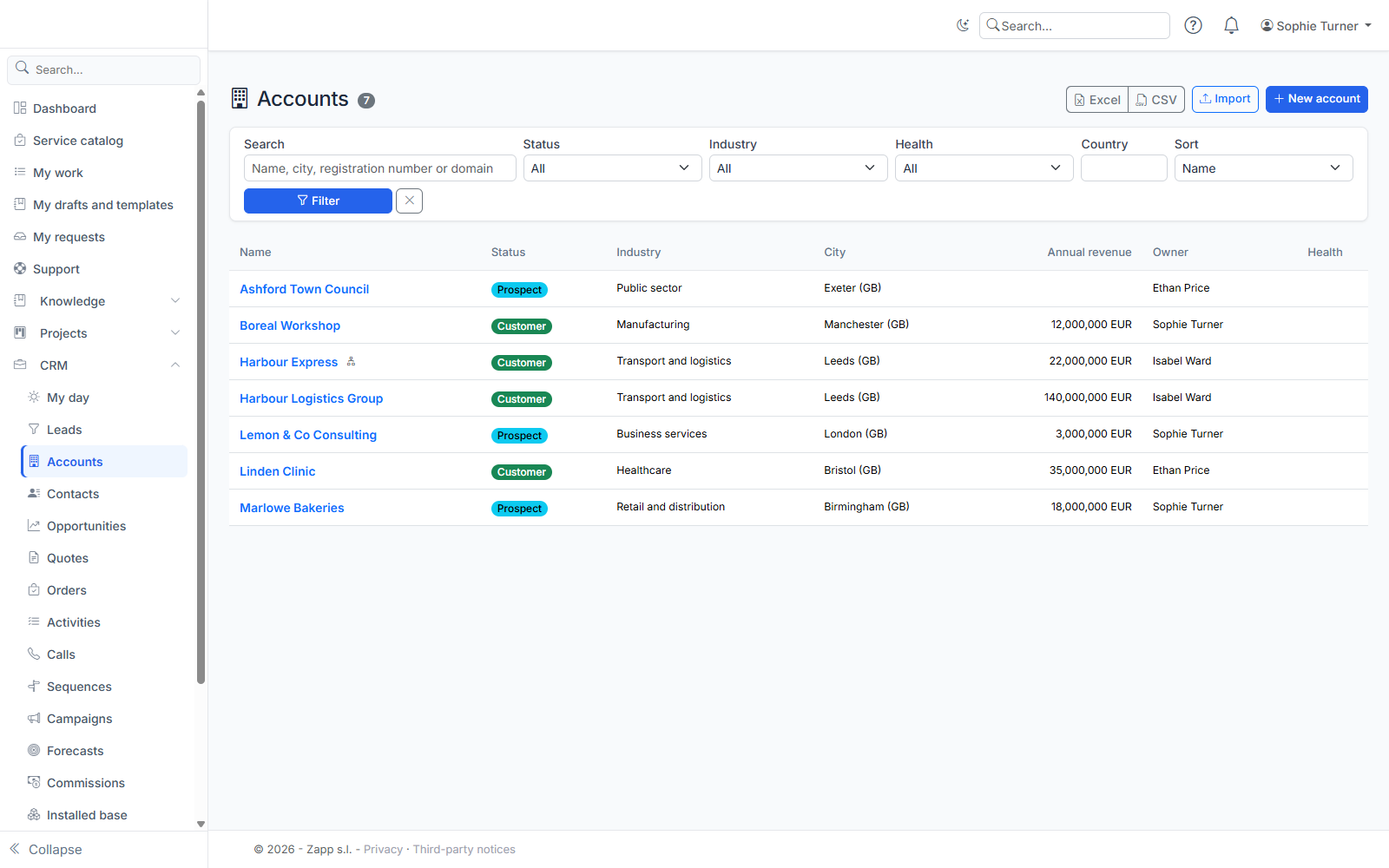
The Excel and CSV buttons export the filtered list (depending on your export right).
Creating an account
Click New account, then choose:
- New organization: enter its name and, if needed, its code. The organization is created together with the account, always as a client organization (a partner or internal organization is created in the Organizations module); whether it is a prospect or a customer is set by the account status;
- Existing organization: search it by name. An organization has only one account.
The account name is the organization's name: if the organization is renamed elsewhere (Organizations module, synchronization), the account follows automatically, in the list and in search.
Then complete the record:
- Identity: status (prospect, customer, former customer, other), industry, source, owner (you, if left empty), parent company;
- Company: registration number, site number, VAT number, legal form, activity code, headcount, annual revenue and its currency;
- Contact details: website, phone, email, address, country (two-letter code: FR, ES…), description;
- your business's custom fields.
For France, the SIREN (9 digits) and SIRET (14 digits) are checked, and the SIRET must belong to the SIREN entered.
Duplicates
While you type, the form flags the accounts that look like the one you are creating (same name without the legal form, same registration or site number, same VAT number, same website, same phone). On save:
- if a blocking criterion matches (for example the same registration number), creation is refused: open the existing account;
- otherwise the similar accounts are listed; check I checked: create or save anyway to confirm.
An account you cannot see is never named: it is only counted.
The account record
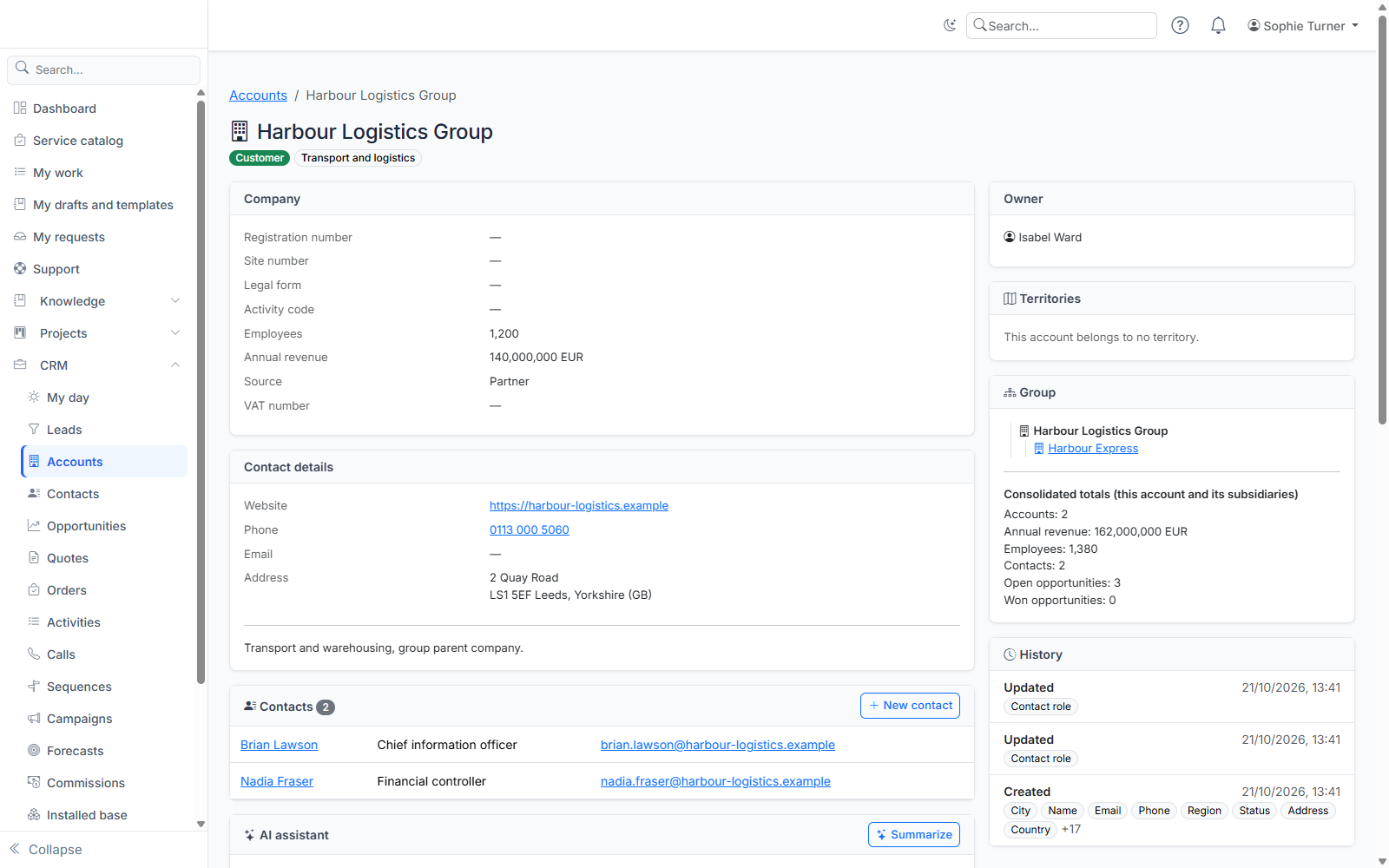
The record brings together:
- the sales view, with a source · date badge on each value read from an official registry;
- the VAT number, its check result and the Check button (EU VIES service);
- the contacts linked to the organization and the New contact button;
- the contact roles on this account (decision maker, buyer…), one of them primary;
- the group: the parent and subsidiaries tree, and the consolidated totals of this account and its subsidiaries (revenue per currency, headcount, contacts). A group account outside your scope appears masked and is only counted;
- the change history.
Enriching an account
The Enrich button searches the company in an official registry (SIRENE for France) by name, SIREN or SIRET. Pick the right record in the results: a table compares the current value and the registry's. Check the fields to take over, then Apply the checked fields. The French VAT number is derived from the SIREN.
Nothing changes without your choice. Each value taken over keeps its source and date; if you retype it by hand, it loses that badge.
If the registry is not configured, ask a CRM administrator to enter its key (see Setting up picklists, duplicates and enrichment).
Parent company and subsidiaries
Choose the parent company in the form, or click New subsidiary from the group card. An account cannot be a subsidiary of one of its subsidiaries.
Reassigning, merging, deleting
- Reassign (Owner card): according to your reassignment scope.
- Merge: see Duplicates, merge, import and export.
- Delete: the organization stays; subsidiaries lose their parent company.